Introduction
After looking at the many ways to create and use VR and AR, I will be going through each, picking which I will be taking forward, why and what I will be doing with it. Along with covering the ethics of what I will be doing, the reasons why I chose it with what research I have done for it as well.
Maya
I am familiar with Maya, having used it before, it also resembles other softwares I use, allowing for usage of it to be very comfortable compared to the other options. It can be used on PCs, which is preferable for me, given accessibility to my work can be an issue if it is reliant on VR Headsets to work. It also leaves the option open for importing assets I create or find, saving time instead of making everything myself, it does however have tools to create stuff in the system as well, making both ways viable.
Finally Maya has the MASHED system, allowing for complex systems to be added, to make scenes diverse and allowing for them to change as seen fit with fall off objects and usages of the timeline.
All of this being said, I have been wanting to use Maya this whole time, however, I wanted to give the other softwares a fair shot, given if I didn’t, I could have missed a better software. But after looking through them, I have found Maya to still stay on top because of what I have listed.
ShapesXR/Open Brush/Gravity Sketch
I am putting these together because they are all very similar, all being VR Softwares that either require a headset, or work better with one. They each have a draw and shapes system, but because of the VR controls, it can be a lot harder to use them to the same extent as in Maya as I had shown when using them.
They also don’t have rendering, relying on videoing, meaning you have to take the camera angles yourself, along with my loss on how to actually move in any of them, being stuck to one spot in each.
This leads these to be more awkward to use compared to Maya due to the controls, the access to a headset being needed and the lack of a timeline or camera system. Shapes XR does have PC access but is more or less a worse Maya from what I could tell, leading it to be better than the others, but still shadowed by Maya.
They were interested to try but were not what I wanted for this sadly.
Adobe Aero
This software is good in concept, for tours or museums, however due to it requiring you to be physically in an area, it can be recorded by normal means but this gimmick is lost when doing this. Along with this, from what I could make out, was highly awkward to use, you can either select a location and work on it on a PC, or use the app, dragging objects on in real time.
However from my usage of it, I only had access to around 3 of the assets, really limiting what I could do. I did hear you can code and animate, however given my lack of experience with animation and coding in the system, it would likely be a lot harder than what I plan to do in Maya, for similar results.
All of that said, it is a lot more difficult to learn this new system, for it to lose its gimmick and be a worse Maya basically, leading me to not take it further.
Zapworks
Zapworks actually works similar to Aero, but also different, they both work off of QR Codes, however when Aero works off locations, Zapworks works off a set image, showing the wanted scene when it is present. Due to this it loses the limitation that Aero gets, it also because of how it works, actually goes through Maya, it being used to create your scene, which is exported to Zapworks, allowing for the ability to use found assets, code and even animate said scene.
However this comes with a downside, because it is online, it limits how much storage a user has, meaning your scene cannot be too complex, especially if it is animated, really restricting what can be done with it. It does also have the issue of the image needing to be flat, if it is for example side on, the scene will clip into the image, ruining it unless you account for this.
It is accessible due to its connection to Maya, usage of QR codes and images and easy access to it on any device. However because of the storage limitation and limitation of having the scene mixed on an image, I found it limited what I wanted, but it was definitely my second choice, given how much it does right for me.
Ethics
Another reason for my looking through multiple softwares was the ethics between then.
Movement
An example being how movement while using it can be dangerous, especially if it is like Pokemon Go, but movement when just in a VR Headset can still be dangerous. These are because the user is unaware of their surroundings while engaging with it, leading to bumping into walls, people, or worse with Pokemon Go’s case.
Due to this Adobe Aero was definitely out of the picture, given it is very similar to mimicking what Pokemon Go did to cause this problem. Zapworks is similar but can be limited alot better, making it more along the lines of using a VR Headset like the other VR Softwares, such as Open Brush.
Another aspect of this is motion sickness, which is mostly a problem with VR Headsets, people wearing them, when moved or on something moving, often start to feel sick, because of how it confuses the body, given it is actually still. This is worse if this person is newer to VR, or if the movement is sudden as opposed to gradual, an exception to this can be teleporting, which if done right, can at least lessen the effect as opposed to actually moving to the location.
Due to this I will be, if at all, using slow movements, in the direction the person should be looking to minimize this as much as I can.
Accessibility
Another ethic I wanted to cover was accessibility, making sure my experience is available to many people and to warn others who may have conditions which could become a problem if not properly warned. This could be epilepsy for example, with flashing lights, meaning if needed I will put a warning to make sure of their safety.
As for the access to the experience itself, I will be using Maya to create my experience, and then exporting it to youtube as a 360 video, meaning all a person needs is a device that can run youtube to access my experience, which most have. This way I don’t restrict who can access it through the need of a VR Headset or other piece of hardware for example.
Age Rating
The last Ethic I wanted to cover was Age Ratings, due to the nature of many experiences not being appropriate for all ages, they have to label themselves as such, this is to make sure the viewer is old enough to have access and to experience that experience.
For example a game like GTA 5 is rated 18, because of its inclusion of drugs, violence, swearing and sex, all of which are not appropriate for ages under. Because of this I will be labeling my experience as such, and taking this into account, as if my target audience is outside of this range, something needs to be changed.
Proposal
Burial Chamber
This idea came to me after watching a demonstration video for one of the tasks which I will put below. It showed me how to properly create a 360 video, which effects I could do in Maya with MASHED, and how I can work around keeping the viewer still.
However after thinking on this and going through the movement ethic I decided I wanted the player to move to use framing to draw their attention, as one problem I had was I kept losing track of what was going on, which I wanted to fix. However this movement will be slow to go with what I went over in said ethic, making sure the viewer is comfortable and to minimize motion sickness.
Inspirations:
- Dark Souls : Remastered (2 and 3)
- Lord of the Rings : The Fellowship of the Ring
- The Elder Scrolls V: Skyrim
- Baldur’s Gate 3 (Menu Screen)
- Sky: Children of Light (Art style)
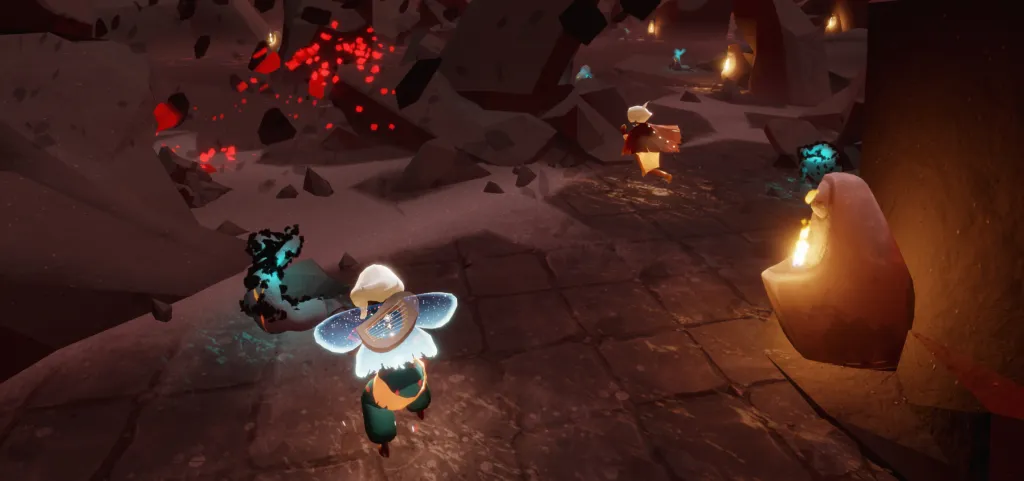
Figure 1, Sky Eye of Eden Ruins
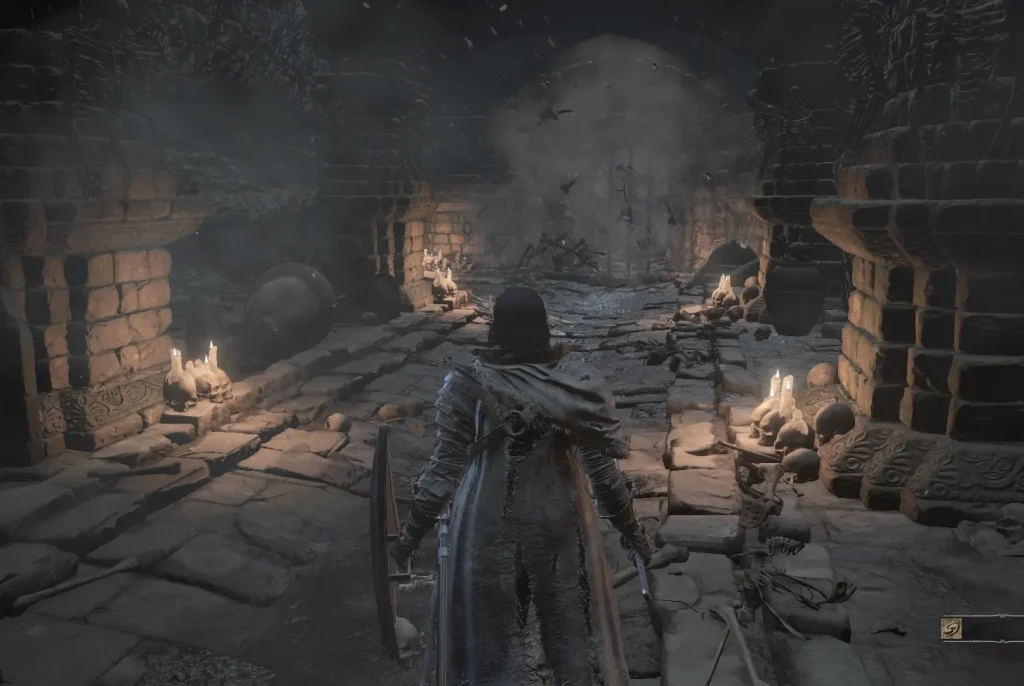
Figure 2, Catacombs of Carthus
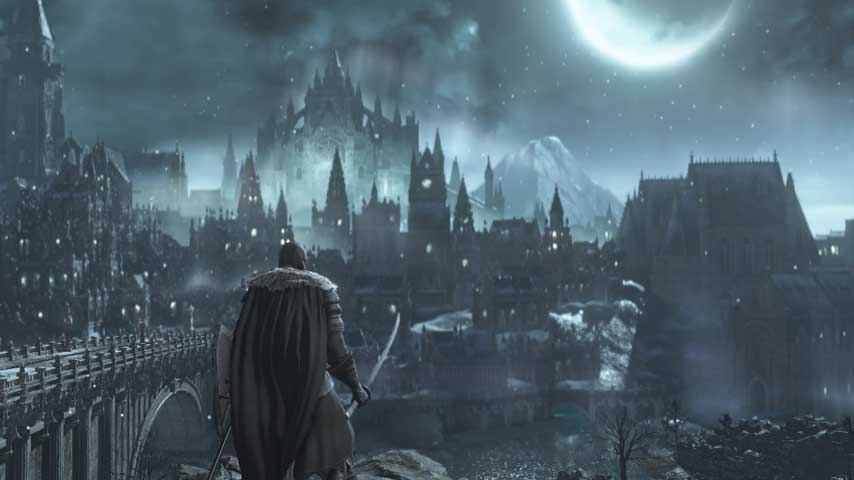
Figure 3, Irithyll of the Boreal Valley
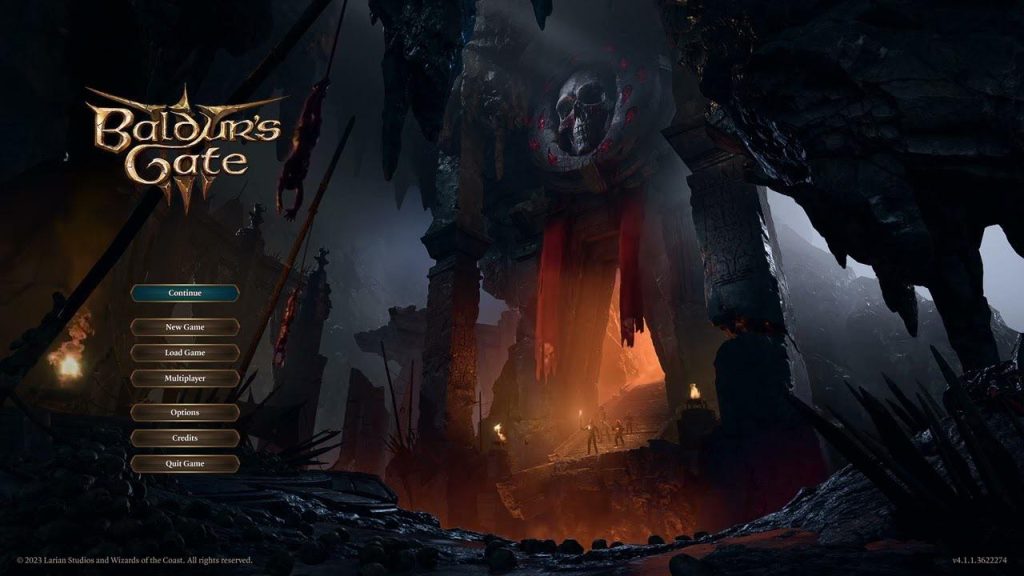
Figure 4, Baldur’s Gate 3 Main Menu
I was very influenced by ‘Dark Souls 3’ for this idea, loving one of the areas and wanting to use it as a base for this experience, this area being (). However it will also be taking from other parts of this game, such as the Ember effect, Yhorm the Giant and their throne, the crowns of ‘Dark Souls 2’ and the Tomb of the Giants from ‘Dark Souls : Remastered’. I did list other ideas however, such as ‘Skyrim’ and ‘Baldur’s Gate 3’ because of settings in them, such as the Crypts in ‘Skyrim’ or the Main Menu in ‘Baldur’s Gate 3’, looking very similar to what I want to go for, meaning I will likely be fixing features from them all to make the environment. Lastly, I listed ‘Sky: Children of Light’ because of its art style, it is very simplistic, which to make what I have planned for this, would be the perfect style to go for, given I plan on making a lot of this experience in the system.
General Concept
You see a flame light, your view coming from it, start in a dark chamber, the walls and floors littered with skeletons (not active), moon light leaking in through cracks. You go up through some imposing doors, presented with a grand skeleton on a throne, armed with a sword, armor and a crown (like High Lord Wolnir in ds3). As you approach the eyes light up with small flames. It then spreads to all the skeletons around the room, they burn, the fire going into the skeleton, its body and sword glowing with the flames like the ember effects. It then gets up, slashing at you. It then cuts to black as the view goes back into the flame, it getting snuffed out, the flame then relights, the view coming back, getting up now on the other side of the door on the end of the chamber, looking forward you see the moon over a city of pale blues in the moonlight. Then the candles round the cliff light suddenly, their flames drawing their power like the skeletons before, as you turn, the door opens as the skeleton emerges, it ending there.
This script is very linear, so to help myself I set it down as a timeline, not only to help it visually, but to help keep track of time for each event (I am aiming for 2 and a half minutes, which is why it goes up to 150 seconds).
Timeline
In void, flame come to, view coming from that – 5 secs (5)
Wake in cavern, lying down – 5 secs (10)
Gets up – 5 secs (15)
Time to look around the starting chamber – 10 secs (25)
Walks up stairs to door – 15 secs (40)
Look at door – 5 secs (45)
Push door open – 10 secs (55)
Look at room inside – 10 secs (65)
Walk inside, up to throne half way – 10 secs (75)
Eyes light up – 5 secs (80)
Skeletons start to light on fire, giving to the king, their body now also being covered in flames – 15 secs (95)
King slashes at you – 5 secs (100)
View goes back into the flame, it snuffing out – 5 secs (105)
Flame relights, the view coming from it again – 5 secs (110
Wake on cliff – 5 secs (115)
Time to look upon city – 10 secs (125)
Candles light, giving power behind you – 10 secs (135)
Doors open, slowly revealing the king – 15 secs (150)
I recognise that until I actually start working on this I will not know how long each action will be, since I have been in this situation before, this timeline is a plan that I know I will likely stretch. I tried to keep it simple by keeping timings to 5s, and by keeping track of the total time in brackets next to each event. That being said it will provide as a guide for how long actions would last, when they should happen and when each event happens compared to others.
Movement and Areas
Because I plan on moving the viewer around, and my previous experience with Maya, I know that having multiple lights rendered at once can really impact the quality. To combat this I will be using the Timeline to unload areas that aren’t needed, hiding the objects once they are out of view, as I think deleting them will still delete them across all time, not just when selected. This is why I used doors and such, so each area could be unloaded, it also helps to frame the part coming from it, as the view will be looking past it, focusing them on what is past the door.
Conclusion
I have decided to use Maya for its ability to import assets, access to a timeline system, access to rendering and camera systems, access to MASHED, accessible on PCs and my familiarity with it. I am making an experience that will be put on youtube so most people can access it without software or hardware worries. It is based highly off ‘Dark Souls : Remastered’, 2 and 3, along with ‘Skyrim’, ‘Baldur’s Gate 3’ and ‘Sky: Children of Light’, all of which for inspiration on the setting, ‘Sky: Children of Light’ being used for art style to help lessen the workload but keep it looking good.
References
| References: | |||
| Figures: | Softwares: | Inspiration: | |
| Figure 1, Sky Eye of Eden Ruins, Ramen Junkie (Lameazoid, 2023) Figure 2, Catacombs of Carthus, Polygon (Polygon Staff, 2017) Figure 3, Irithyll of the Boreal Valley, VG247 (Staff, 2016) Figure 4, Baldur’s Gate 3 Main Menu, Reddit Post (halluciin, 2023) | Open Brush (2021) Icosa Foundation [Video game]. https://store.steampowered.com/app/1634870/Open_Brush/ Gravity Sketch (2017) Gravity Sketch Limited [Video game]. https://store.steampowered.com/app/551370/Gravity_Sketch/ ShapesXR (2021) Tvori Inc. [Video game]. https://www.shapesxr.com Unity (2005) Over the Edge Entertainment [Video game]. https://unity.com/ Unreal 5 [2022] Epic Games [Video game]. https://www.unrealengine.com/en-US/unreal-engine-5 Adobe Aero (2019) Adobe Inc. [Video game]. https://www.adobe.com/uk/products/aero.html | Dark Souls : Remastered (2018) From Software. [Video game]. https://store.steampowered.com/app/570940/DARK_SOULS_REMASTERED/ Dark Souls 2 (2014) From Software. [Video game]. https://store.steampowered.com/app/236430/DARK_SOULS_II/ Dark Souls 3 (2016) From Software. [Video game]. https://store.steampowered.com/app/374320/DARK_SOULS_III/ Lord of the Rings : The Fellowship of the Ring (2018) New Line Cinema [Movie]. https://www.netflix.com/it-en/title/60004480 The Elder Scrolls V: Skyrim (2011) Bethesda Game Studios [Video Game]. https://store.steampowered.com/app/72850/The_Elder_Scrolls_V_Skyrim/ Baldur’s Gate 3 (2023) Larian Studios [Video game]. https://store.steampowered.com/app/1086940/Baldurs_Gate_3/ Sky: Children of Light (2024) thatgamecompany [Video game]. https://store.steampowered.com/app/2325290/Sky_Children_of_the_Light/ | |